How to Use Dreamina Seedance 2.0/2.5 for Free via TikTok Ads: Complete Guide
Learn TikTok Symphony's free weekly credit system, the real Seedance 2.0 access threshold, how Seedance 2.5 currently behaves, and how ttoh.app incentives can lower ad costs.
TL;DR
Sign in to Symphony Creative Studio with a TikTok Ads Manager-linked identity to receive 2,000–4,000 free weekly credits; unlinked accounts stay on the 1,000-credit Basic Plan. TikTok's UI cites $5,000 of spend in the past 30 days for Seedance 2.0 access, but tested accounts have unlocked sooner after 3–7 days of stable spend around $100 per day. Seedance 2.5 is visible in the web interface but remains permission-gated on the tested account. Eligible ttoh.app offers can further reduce out-of-pocket ad costs.
Dreamina Seedance 2.0 is now integrated directly into TikTok Symphony Creative Studio. If you already advertise on TikTok, that gives you a practical way to generate native video creatives without paying for a separate AI video subscription.
One distinction matters: free generation credits do not mean free advertising spend. A new account may receive weekly Symphony credits immediately while Seedance 2.0 remains locked. Credits and model access are separate systems.
As of August 4, 2026:
- Dreamina Seedance 2.0 is verified working on eligible accounts, with support for multiple references, multi-scene creation, audio, and videos up to 15 seconds.
- Dreamina Seedance 2.5 is visible in Symphony’s web model selector and API layer, but the tested account still receives a “no model usage permission” response. The accurate description today is: 2.5 is visible, but not broadly enabled.
1. TikTok Symphony credit tiers and rules
Symphony currently offers three weekly credit tiers:
| Tier | Free weekly credits | Main condition | Best for |
|---|---|---|---|
| Basic Plan | 1,000 | No linked TikTok Ads Manager account | Basic exploration and light creation |
| Plus Plan | 2,000 | A linked, active Ads Manager account | Regular video production |
| Pro Plan | 4,000 | At least one ad using a Symphony-generated video published in the last 30 days | Creative testing at scale |
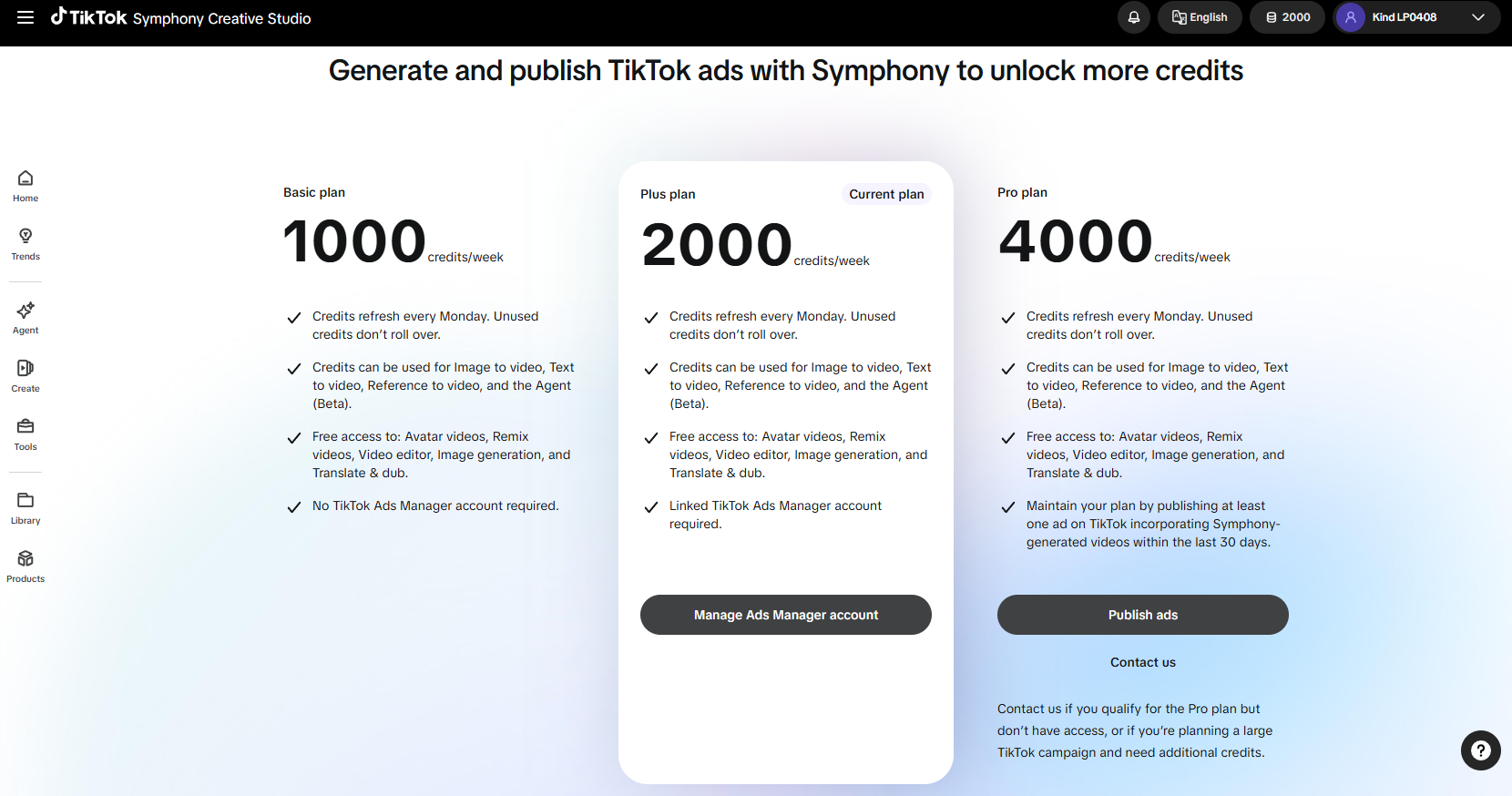
The rules worth remembering are simple:
- Account linking: When you sign in with the same TikTok for Business identity, Symphony usually recognizes the existing Ads Manager account. Confirm the actual link status on the credit page.
- Reset schedule: Credits refresh every Monday at 00:00 UTC.
- No rollover: Any unused balance expires at the weekly reset.
- Tools that consume credits: Text to Video, Image to Video, Reference to Video, and Symphony Agent. The current interface typically shows a 5-credit cost for a 5-second video.
- Tools shown as free: Avatar, Remix, Video Editor, Image Generation, and Translate & Dub currently do not consume credits.
2. Unlocking Seedance 2.0: the official notice vs. real testing
New Ads Manager accounts often see only Video 1.5 Pro in the model menu. Selecting Seedance 2.0 can display this notice:
No Dreamina Seedance 2.0 access: Top-spending linked Ads Manager advertiser requires $5K+ spend in the past 30 days.
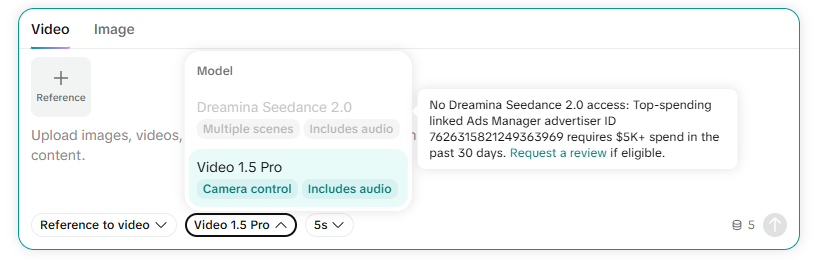
The public message points to more than $5,000 of spend over the previous 30 days, sometimes followed by a Request a review step.
In practice, the backend appears more flexible. Tested accounts that had not reached $5,000 received Seedance 2.0 access after 3–7 days of stable, natural delivery at roughly $100 per day. Some permissions appeared within another 1–3 business days.
That is useful evidence, but not a guaranteed shortcut. Region, payment history, ad quality, policy standing, linked-advertiser history, and TikTok’s rollout schedule may all affect the decision. Treat $5,000 as the threshold shown in the product and earlier access as an account-specific observation.
3. A low-cost AI video advertising workflow
Step 1: start with an eligible TikTok Ads offer
If you already plan to open a new Ads Manager account, check the current TikTok Ads offers on ttoh.app before registering. Depending on the market and account, an eligible offer may include advertising credits, spend-and-get incentives, or another new-advertiser benefit.
The advantage is straightforward: if you were going to test TikTok ads anyway, returned ad credit can reduce the cash cost of building that initial campaign history.
Always confirm the promotion inside Ads Manager before counting it. A referral link does not guarantee that every account receives the same incentive, and it does not guarantee Seedance access.
Step 2: sign in to Symphony and confirm the account link
- Open TikTok Symphony Creative Studio and sign in with the same TikTok for Business identity used for Ads Manager.
- Open the credit menu and confirm that Symphony recognizes the correct advertiser.
- Once linked, the account will typically move from the Basic Plan’s 1,000 weekly credits to the Plus Plan’s 2,000 credits per week.
If Symphony does not recognize the advertiser automatically, use Manage Ads Manager account on the credit page to check or manage the link.
Step 3: build a stable, compliant campaign history
Run normal product, app, or lead-generation campaigns. The goal is not a ritualized “account warm-up”; it is to establish credible advertising activity:
- Use a valid payment method without repeated billing failures.
- Run approved creatives with working landing pages.
- Maintain stable delivery for 3–7 days, using a budget justified by the campaign itself.
- Make sure spend occurs on the same advertiser linked to Symphony.
- Check the Symphony model menu periodically for Seedance 2.0 access.
If Request a review appears, submit it. If you are below the displayed threshold, you can keep running legitimate campaigns and wait for the system to update, but do not assume a guaranteed unlock date.
Step 4: generate Seedance videos with free credits
Once Dreamina Seedance 2.0 is available—or 2.5 eventually becomes enabled—you can begin creating ad variants.
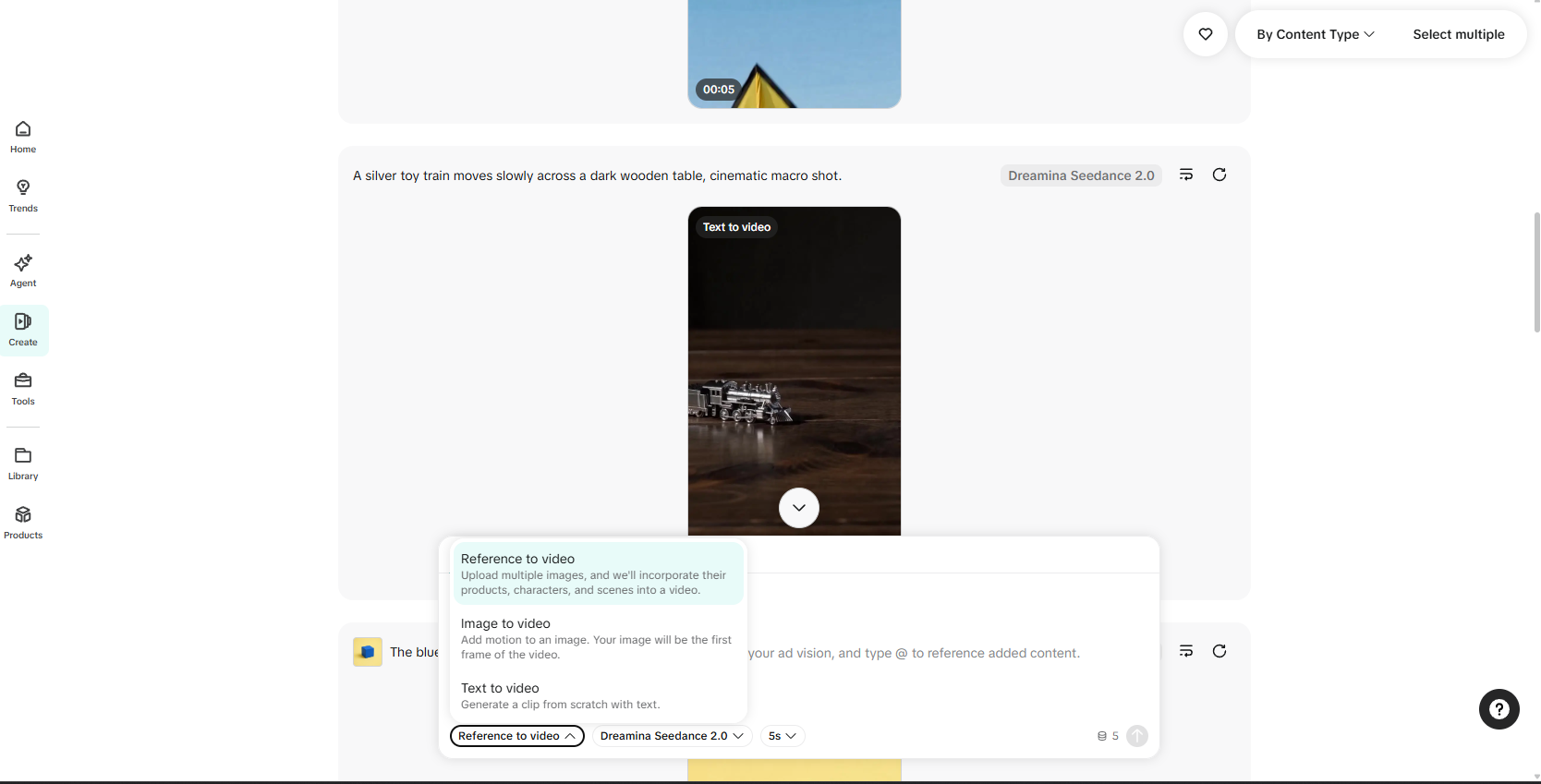
Reference to Video: the best fit for e-commerce
Upload product angles, model photos, or a background scene, then use @ in the prompt to reference each asset. For example:
@Image1 as the main character, standing in @Image2 and holding @Image3. Slow camera push-in, realistic commercial lighting, native TikTok ad pacing.
This mode lets you tell the model who the subject is, which product matters, and where the scene should take place. It usually provides better product and character consistency than pure text generation.
Image to Video: animate an existing product image
Upload a product image or poster as the first frame. Instead of repeating what is already visible, focus the prompt on movement:
Slow push in, cinematic studio lighting, subtle product rotation, realistic reflections.
Text to Video: test concepts without source assets
For pure creative testing, a useful prompt structure is:
Subject or product + environment + action + lighting and camera movement + native TikTok style and pacing
If Seedance 2.5 returns a model-permission error, switch back to 2.0. A visible model name is not proof that the account can run it.
Step 5: move up to 4,000 weekly credits
The condition shown for the Pro Plan is publishing at least one TikTok ad that uses a Symphony-generated video within the previous 30 days.
Build that into your normal testing cycle:
- Use weekly credits to generate multiple hooks, demonstrations, or short story concepts.
- Edit and review the strongest candidates for accuracy, rights, and policy compliance.
- Publish the variants worth testing in Ads Manager.
- Return to the credit page and confirm whether the account has received the Pro Plan.
- Publish another Symphony-assisted creative before the 30-day window expires if you want to maintain eligibility.
Publishing an ad is the displayed condition, but the actual upgrade timing and account status remain controlled by TikTok.
4. The realistic cost formula
The useful calculation is:
Actual cost = planned TikTok ad spend − eligible TikTok ad credits + $0 Symphony generation cost within the weekly allowance
If TikTok ads are already part of your acquisition plan, Symphony’s 2,000–4,000 credits become extra creative-production capacity. An eligible offer found through the ttoh.app TikTok Ads offer portal can reduce the media cost as well.
The real savings are not a way to erase TikTok’s eligibility threshold. They come from two places: generation fees you no longer pay to a separate AI tool, and qualifying advertising credits returned against spend you were already planning.
5. Final checklist
- Registered through an eligible ttoh.app TikTok Ads offer and confirmed the promotion in Ads Manager.
- Signed in to Symphony with the same identity and confirmed the linked advertiser and weekly credit tier.
- Ran legitimate, policy-compliant campaigns with stable billing and working landing pages.
- Checked Seedance 2.0 access after several days instead of assuming a guaranteed unlock date.
- Completed a test generation to confirm that the model is truly enabled, not merely visible in the menu.
- Used only product, character, and video assets you own or are licensed to use.
- Scheduled remaining generations before Monday 00:00 UTC to avoid losing unused credits.
If you already advertise on TikTok, the workflow is compelling: your ad budget continues doing its normal acquisition job, Symphony credits handle creative production, and an eligible ttoh.app offer reduces part of the media cost. The key is to use Seedance as a free creative layer inside a real advertising workflow—not as a reason to spend money solely for model access.
FAQ
Can I use Dreamina Seedance 2.0 for free in TikTok Symphony?
Yes, provided your account has unlocked model access. Video creation within Symphony's weekly credit allowance has no separate generation charge, although the advertising spend used to establish or maintain eligibility remains a real cost.
Do I need to manually link TikTok Ads Manager in Symphony?
Symphony usually recognizes Ads Manager accounts under the same TikTok for Business identity. Check the credit page to confirm the link; an unlinked account stays on the Basic Plan with 1,000 credits per week.
Do I strictly need to spend $5,000 in 30 days to unlock Seedance 2.0?
That is the benchmark displayed in TikTok's access notice. In testing, some accounts unlocked after 3–7 days of stable spend around $100 per day, but earlier access is an account-specific result rather than an official guarantee.
Is Dreamina Seedance 2.5 available now?
Seedance 2.5 is visible in Symphony's web interface and API layer, but the tested account still receives a model-permission error. Treat it as visible but not generally enabled.
When do TikTok Symphony credits reset?
Credits reset every Monday at 00:00 UTC. Unused credits do not roll over to the next week.